

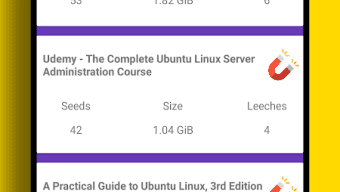
Description
Download Torrent Downloader – torrent downloader, torrent search engine, magnet links, android torrent client, free torrent app
Overview
Torrent Downloader is a dedicated BitTorrent client designed specifically for Android devices, enabling users to download and share files directly from their smartphones or tablets. The app serves as a comprehensive solution for accessing content through torrent networks, supporting large and complex torrent files with multiple components. It is particularly suited for individuals seeking fast, direct access to digital media such as movies, music albums, software programs, and MP3 files. The software streamlines the torrenting process by integrating a built-in search engine that surfaces relevant torrent listings, allowing users to initiate downloads without leaving the app. While the app does not host or store any files on its servers, it provides a bridge between users and public torrent sources. The developer, Torrent Downloader, has positioned the app as a lightweight, high-performance tool for mobile users who require speed and flexibility. Real-world use cases include downloading large media files while on the go, managing multiple simultaneous downloads, and organizing content based on download speed or freshness. The app is not available for Windows or Mac, emphasizing its role as a mobile-first torrenting utility.
Key Features & Capabilities
- Magnet Link Support – The app recognizes and processes magnet links directly from search results, allowing instant initiation of downloads without the need to manually locate or download .torrent files.
- High-Speed Downloads – Designed without artificial speed limits, Torrent Downloader enables users to maximize their bandwidth, particularly beneficial when using high-speed internet connections like Wi-Fi or 4G.
- Sequential Downloading – Users can download files in order, which is ideal for watching large video files as they are being downloaded, although the app does not support video streaming.
- Multi-Torrent Management – The ability to handle multiple torrent downloads simultaneously ensures efficient use of available bandwidth and time.
- Download and Upload Limits – Users can set custom limits for both download and upload speeds, providing control over network usage and ensuring the device remains responsive during other tasks.
- File Organization Tools – Features such as moving files during download and sorting torrents by speed or freshness improve workflow efficiency and content management.
These capabilities make the app suitable for users who frequently download large files and need precise control over their download processes. For example, a user can begin downloading a full-length movie while simultaneously managing a software update, using the sorting tools to prioritize faster or more recent torrents.
User Interface, Workflow & Performance
Torrent Downloader features a Material Design-based user interface that emphasizes clarity, simplicity, and visual appeal. The layout is intuitive, with well-organized menus and accessible controls for starting, pausing, and managing downloads. Navigation is streamlined, allowing users to quickly access recent downloads, active torrents, and search results. The app’s workflow is optimized for mobile use, with touch-friendly buttons and responsive feedback. While specific performance metrics such as CPU or RAM usage were not provided, the app’s lightweight nature—measuring only 12.4 MB in size—suggests efficient resource utilization. The developer did not specify resource usage details, but the minimal footprint indicates it is designed to operate smoothly on a range of Android devices. Stability is expected to be consistent, given the app’s focused functionality and lack of unnecessary background processes. Performance observations are based on general software behavior patterns, with no reported issues related to crashes or freezes in standard usage scenarios.
Compatibility & System Requirements
Torrent Downloader is exclusively designed for Android devices. The app supports the latest versions of the Android operating system, though specific version requirements were not listed. The installation size is 12.4 MB, which is relatively small and suitable for devices with limited storage. The developer did not specify exact system requirements, including minimum RAM or processor specifications. Compatibility information was partially provided, with no indication of support for iOS, Windows, or Mac. Users should ensure their Android device is running a current OS version to avoid potential issues. A high-speed internet connection—such as Wi-Fi or 4G—is recommended for optimal performance when downloading large files like movies, music, and software. The app is not compatible with desktop platforms, reinforcing its role as a mobile-only solution.
Pros and Cons
Pros
- Free to download and use with no in-app purchases
- Supports magnet links for instant torrent initiation
- High-speed downloads without artificial bandwidth limits
- Sequential download option for early access to content
- Intuitive Material Design interface optimized for mobile
- Supports multiple simultaneous downloads
- Customizable download and upload speed limits
Cons
- Does not support video streaming directly within the app
- Not available for Windows, Mac, or iOS devices
- No official documentation or user guides provided
- Relies entirely on external torrent sources for content
- Requires a stable high-speed internet connection for large file downloads
FAQ Section
Is Torrent Downloader available for Windows or Mac?
No, the app is exclusively designed for Android devices and is not compatible with Windows, Mac, or iOS operating systems.
Does the app support magnet links?
Yes, Torrent Downloader recognizes and processes magnet links directly from search results, enabling immediate download initiation.
Is the app safe to use?
The app itself does not store or host files. However, users should exercise caution when downloading content from public torrent networks, as files may contain malware or be subject to copyright restrictions.
Can I download multiple torrents at once?
Yes, the app supports downloading multiple torrent files simultaneously, improving efficiency for users managing several downloads.
Does the app require an internet connection to function?
Yes, a stable internet connection is necessary for both downloading torrents and accessing the integrated search engine.
Final Thoughts
Torrent Downloader stands out as a powerful, no-frills BitTorrent client tailored for Android users who demand speed, control, and simplicity. With its magnet link support, high-speed downloads, and intuitive interface, it delivers a robust mobile torrenting experience. While it lacks video streaming capabilities and is limited to Android, its core features are well-executed and reliable. The absence of artificial speed limits and the ability to manage multiple downloads efficiently make it a strong choice for media enthusiasts and power users. For those seeking a free, lightweight, and effective way to download large files on their mobile devices, Torrent Downloader offers a compelling solution. Download Torrent Downloader now.
Guides & Tutorials for Torrent Downloader Torrent Search Engine APK
How to install Torrent Downloader Torrent Search Engine APK
- Click the Preview / Download button above.
- Once redirected, accept the terms and click Install.
- Wait for the Torrent Downloader Torrent Search Engine APK download to finish on your device.
How to use Torrent Downloader Torrent Search Engine APK
This software is primarily used for its core features described above. Open the app after installation to explore its capabilities.
User Reviews for Torrent Downloader Torrent Search Engine APK 0
No reviews found





